Log in and out
Let's take a look at how to log in and out of Planning.
Log in as an owner or user
Sage Planning uses single sign-on (SSO) with Sage Intacct, so after you log into Sage Intacct, you are also logged in to Planning.
Start
A Sage Intacct administrator from your organization must first initiate Planning, as described in Initiate Sage Planning.
-
Make sure you are logged in to Sage Intacct with your Sage Intacct credentials.
-
Open Planning any time with the following link: https://core.intacct-planning.com
Log in as a partner
This procedure is for users who have access to the Partner console in Sage Intacct.
As a partner, you often work with multiple Sage Intacct instances for multiple organizations. There is a secure process to log in to Planning that ensures security and data integrity, which allows you to have only one Planning instance open at a time.
Start
-
From Sage Intacct, go to Applications > Console > Instances.
-
From My instances, navigate to the instance you want to slide in to, and select Switch to Instance.
For more information, see Slide in to an instance in the Sage Intacct help center.
-
Select Planning from the app switcher or go to the Applications > Planning.
If you don't see Planning, do the following:
-
In Sage Intacct, from Company > Users, navigate to your user and select Edit.
-
In Product access, make sure Planning is checked.
-
-
From the Choose identity tab, select the instance of Planning you want to open.
Planning opens in a new tab.
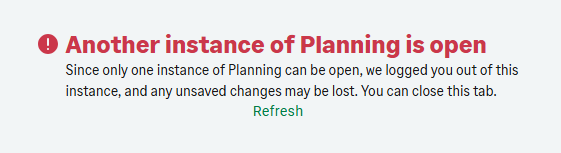
Only one instance of Planning can be open at any given time.
If another Planning instance is open, you are logged out of that instance. Any unsaved work is lost.
Jordan is a Sage partner who manages Sage Intacct for two organizations: Style Shoes and Seeds of Hope.
He slides into the Style Shoes instance, opens Planning from the app switcher, and then from the Choose identity tab, he selects Style Shoes.
When he needs to review the Seeds of Hope plan, he slides in to that instance and opens Planning. He then tries to pick up where he left off from the Style Shoes Planning tab, but a message explains that only one instance of Planning can be open.
Log out
When you log out of Planning, you are still logged in with SSO with Sage Intacct, even if Sage Intacct isn't open in your browser.
Start
-
Do one of the following:
-
If Sage Intacct is open in your browser, navigate to Sage Intacct.
-
If Sage Intacct is not open in your browser, open Sage Intacct and log in with your Sage Intacct credentials.
-
-
From Sage Intacct, select your user name that appears in the top right corner of the app, and select Log out.
Now that you are logged out of Sage Intacct, you are also logged out of Planning.
Is this helpful?
In this topic